Patch notes
Winter update (6) Improved monitor settings
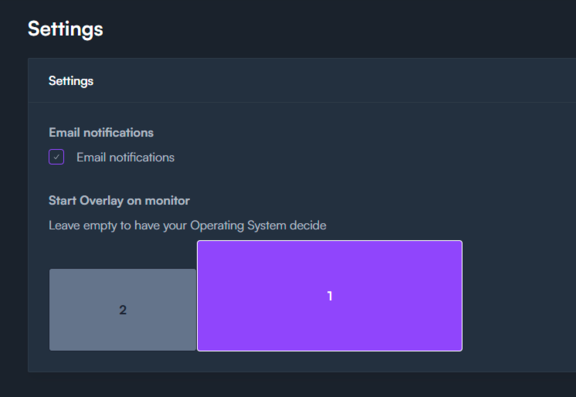
The StreamAlertsTV Overlay sometimes had a mind of its own. It would start up, and jump towards another monitor, not always was this the desired monitor. We fixed this problem! You can go to Settings and set up a dedicated monitor to place the overlay.
New features and content
- - Select the monitor you want to use in the settings, the overlay should start on this monitor.
- - We added a Windows Error pop-up to celebrate, check it out under games > cursor effects!

Next week, we're rolling out new animations, visual effects, and various improvements. These updates will be added to the existing bundles in the shop, giving you more content for the same price. If you've already purchased a bundle, the new additions will be unlocked for you automatically.
There are only 2 weeks left before the Twitch Hackathon results are out. Please tell your streaming friends to try Lights Out! and help us win.
If you have ideas for new games, comment here or join our Discord!
Get it on Steam

Jeroen van Baar
Founder, StreamAlertsTV
Building tools that make streams more interactive, one act of chaos at a time.
Ready to make some chaos?
Install the overlay, connect your channel, and let your viewers make your next clip for you.